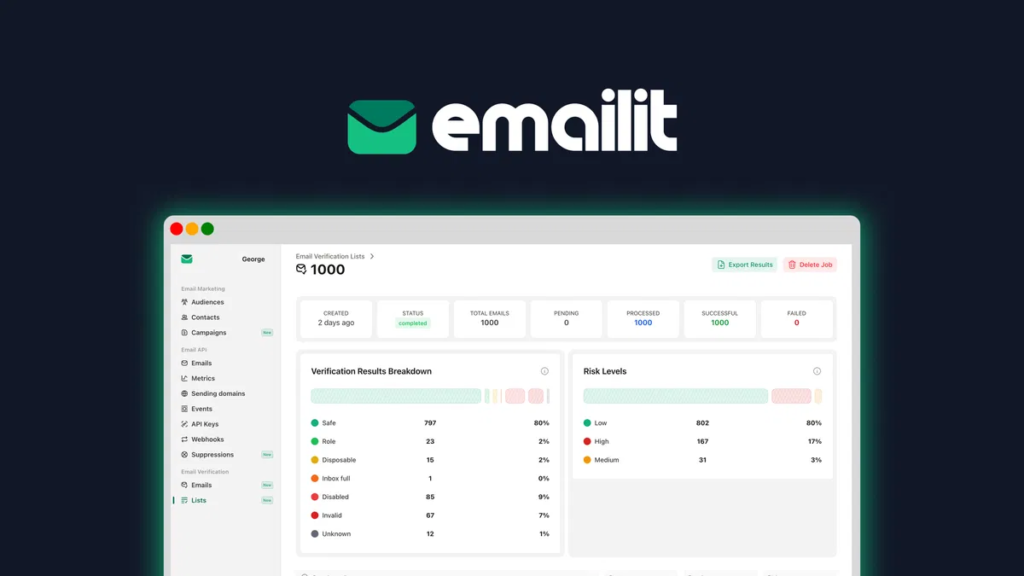
Emailit Review: If you’re eyeing the AppSumo lifetime deal, read this first. Emailit delivers well with AI-driven segmentation and smart triggers like cart abandonment, but the UK entity dissolved in January 2025—raising real questions about long-term stability. That matters if your emails drive revenue. In this Emailit Review, you’ll learn how it performs on real-time personalization, deliverability, integrations (like FluentCRM), and where automation hits limits. We’ll also cover ownership concerns tied to FunFirst s.r.o./Jiří Žižka, support reliability, and safer alternatives like Neo or MailerSend.
Direct answer: Emailit is strong on deliverability and personalization, but ownership opacity and a dissolved UK company make it risky for long-term use; evaluate alternatives if reliability is critical. You’ll get free monthly credits and a clean UI, with some automation gaps. Curious how these trade-offs compare in real campaigns—and what to check before you commit?
Introduction
So, what happens when a promising email tool suddenly has a dissolved company behind it? I looked into Emailit and found its UK entity, EMAIL IT LTD, dissolved in January 2025—raising red flags about its regulatory status.
Despite filings showing activity through 2024, the closure leaves users in a gray area.
Add founder ambiguity, with conflicting claims pointing to FunFirst s.r.o. or individuals like Jiří Žižka, and it’s clear: ownership isn’t transparent.
Still, the tool offers real value—quick setup, solid deliverability features, and AppSumo lifetime deals. Just know the risks.
If stability matters, proceed with caution—but for short-term use? It might still work for you. It functions primarily as an ESP focused on delivery, not a full marketing platform, which clarifies its role when paired with tools like FluentCRM or Sendy. The service supports both REST API and SMTP integration, making it adaptable for developers needing flexible email delivery options.
Ai-Powered Email Automation Tool
Now, let’s talk about what Emailit actually does—and it’s more helpful than the sketchy company background might suggest. Its automation tool isn’t just basic scheduling; it uses smart triggers to send emails based on user actions, so you’re never going off topic. Set up welcome sequences, cart reminders, or follow-ups that feel timely, not random. Unlike an unrelated topic thrown in last minute, these workflows stay focused. You avoid spamming people because the system learns pacing. It’s not AI predicting your coffee order, but it keeps messages relevant and on track—literally. Automation here means less guesswork, fewer mistakes, and no awkward “why did I get this?” moments. Simple, useful, and quietly smart. It integrates instantly via SMTP or Rest API, enabling immediate use after setup. This efficiency is backed by self-owned EU-based infrastructure, ensuring data remains secure and within regional compliance boundaries.
Ai-Driven Email Personalization
I’ve seen how AI-driven customization can make emails feel like they’re speaking straight to you, not just blasting generic messages. Tools like dynamic content generation swap in tailored product picks or article links based on what each person likes, while behavioral trigger automation sends the right message when someone abandons a cart or browses a category twice. Predictive subject lines and real-time personalization engines bump relevance up even more, and smart audience segmentation means you’re not guessing who sees what—AI sorts it quietly behind the scenes. Open rates are 29% higher than generic campaigns thanks to AI-crafted personalization. This level of precision is powered by automated segmentation, which continuously analyzes customer behavior and demographics to deliver hyper-targeted content.
Dynamic Content Generation
What if your emails could read minds—well, not literally, but close? With dynamic content generation, AI crafts tailored emails in real time, using your data to fuel dynamic storytelling that resonates. I’ve seen it bolster open rates by29% and click-throughs by up to50%. It personalizes subject lines, body text, and CTAs based on behavior—like adding ✅ or 🚀 to increase emoji usage that grabs attention. You’ll convert more because the message feels made *for* one person—yours. Just guarantee your CRM feeds clean data. No magic, but close. Start small: test one AI-generated campaign. Watch opens climb. You’ve got this. This level of customization is powered by hyper-personalization at scale, where AI analyzes user behavior, purchases, and engagement to create uniquely relevant content for each recipient. 75% of marketers believe personalization is crucial for improving email marketing effectiveness.
Behavioral Trigger Automation
Think of behavioral triggers as your email marketing’s nervous system—automatically reacting the moment someone takes action. When a user abandons their cart, I send a tailored reminder with a discount—tying directly to my pricing strategy. Browsing a product three times? They get a special offer. It’s AI-driven personalization that works.
Yeah, deployment challenges exist—like setting up tracking or syncing tools—but they’re fixable with clear planning. I map triggers using real behavior, not guesswork. The result? Higher opens, better clicks, and stronger sales. Skip the batch blasts. Focus on actions that matter, respond fast, and watch engagement grow. It just makes sense. This approach leverages automated sending based on behavior to deliver timely, relevant messages that enhance customer experience. These triggered emails rely on behavioral trigger automation, ensuring messages align precisely with user actions.
Predictive Subject Lines
Predictive subject lines are your secret weapon for cutting through inbox noise—no more guessing what works. I use AI to score every variation, so I send what’s most likely to get opened. My system analyzes personalization signals like past clicks, location, and timing to tailor each line. Results? Open rates jump 10–41%, depending on how clean your list is.
| Signal Type | Example Use | Impact on Subject Line |
|---|---|---|
| Behavioral | Recent site visits | “Still interested in [product]?” |
| Demographic | Age, region | Adjust tone, emoji use |
| Temporal | Local time, holidays | “Last day for summer shipping!” |
| Linguistic | Past engagement style | Use questions or numbers |
| Deliverability | Spam complaint history | Avoid trigger words |
Predictive subjectlines aren’t magic—they’re smart math with real results.
Real-Time Personalization Engines
Ever wonder how some emails feel like they’re reading your mind—showing the right product, at the right time, with prices that just dropped? I’ve seen it firsthand: real-time personalization engines use real time data—like your last click or cart update—to tailor messages the moment you open them. Thanks to latency optimization, changes appear in milliseconds. Open an email, and the content updates live—no refresh needed. It’s why you see “back in stock” items or last-minute deals that feel eerily precise. Dynamic content, triggered sends, and smart suppressions make this possible. The result? Higher clicks, better sales, and fewer wasted emails. If you’re not using real-time engines, you’re sending stale messages. Time to upgrade.
Audience Segmentation Intelligence
Real-time personalization grabs attention the moment someone opens an email, but if you’re sending those hyper-responsive messages to the wrong people, you’re just speeding down the wrong road.
I rely on AI-driven audience segmentation to cut through noise and target smarter. It uses behavioral, demographic, and lifecycle data—not just guesses. The tool spots hidden patterns, predicts who’ll buy or churn, and adjusts segments as people act.
I love the niche features like cold-start modeling for new users.
Still, watch for pricing gaps if you need full CDP integration. It’s worth it for engagement lifts, but plan your budget. Target right, and you’ll skip wasted sends.
Pricing
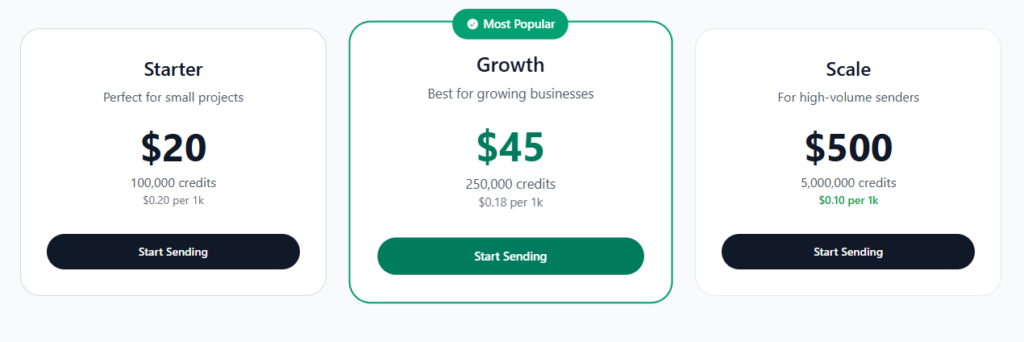
How much will it really cost to send emails at scale? Emailit keeps it simple with flexible pricing models. I pay per credit—each equals one email—and bigger bundles save me up to 50%. The Scale bundle gives 5 million credits for $500, just $0.10 per 1,000 emails. I love that credits never expire. Plus, the free 1,000 monthly credits let me test easily.
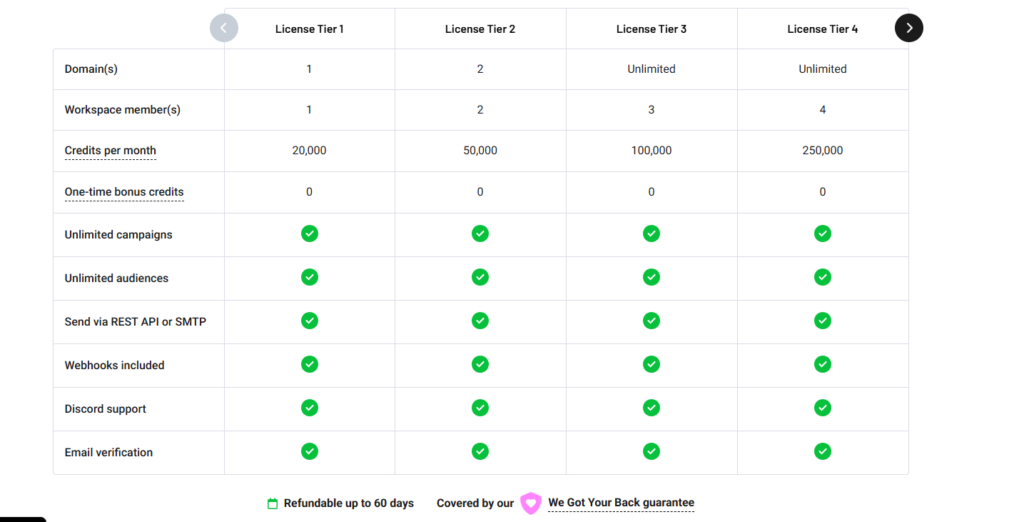
But the real win? Lifetime deals. For a one-time fee, I get unlimited campaigns and monthly credits forever—no subscriptions. Tier 3 gives me unlimited domains for $169. Compared to alternatives, it’s a steal. I’d grab a lifetime deal early.
Pros and Cons
I’ve found Emailit works well for sending emails that actually land in inboxes, thanks to solid tools like SPF/DKIM setup and real-time tracking. It’s beginner-friendly with a clean interface and responsive support, though some features—like automation and detailed reporting—might leave power users wanting more. If you’re running small to mid-sized campaigns and value reliability over flashy bells and whistles, it’s a strong pick.
Pros
Ever wonder what makes an email tool actually worth your time? After testing Emailit, the pros clearly outweigh the cons. It’s built for real results without the learning curve.
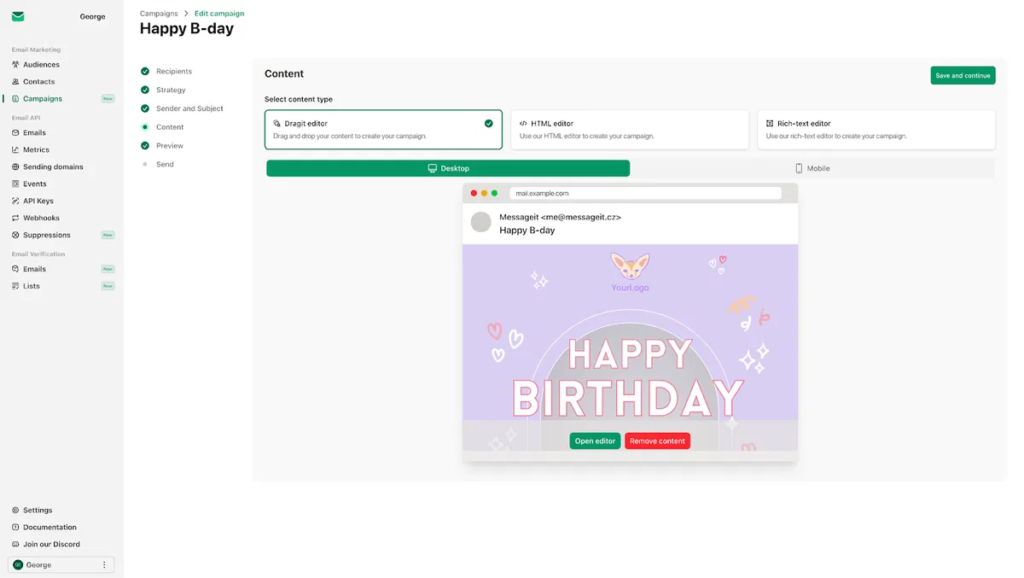
- The drag-and-drop editor lets me design sleek emails fast—no coding needed.
- Automation tools handle welcome sequences and follow-ups, saving me hours every week.
- With real-time analytics, I see opens, clicks, and replies instantly, so I tweak campaigns on the fly.
Emailit’s integration options and high deliverability mean my messages hit inboxes fast. It’s not perfect—no tool is—but the pros and cons aren’t even close. I’m sticking with it.
Cons
Let’s talk flaws—because no tool is flawless. Emailit falls short in ways that can hurt your trust and workflow.
- Spotty delivery & hidden limits: I hit an undisclosed 1,000-email/hour cap, and 10,000+ transactional emails failed—risky for campaigns.
- Weak support & tech bugs: A rep named George dismissed valid issues, and the template editor wiped hours of work—no auto-save.
- Poor data portability & integrations: Migrating was a mess—no help exporting data, and limited tools mean I juggle Zapier.
Online security feels shaky without transparency. If you need reliable scaling or full data control, think twice. Simple setups might survive, but complex needs? Probably not.
User Experience
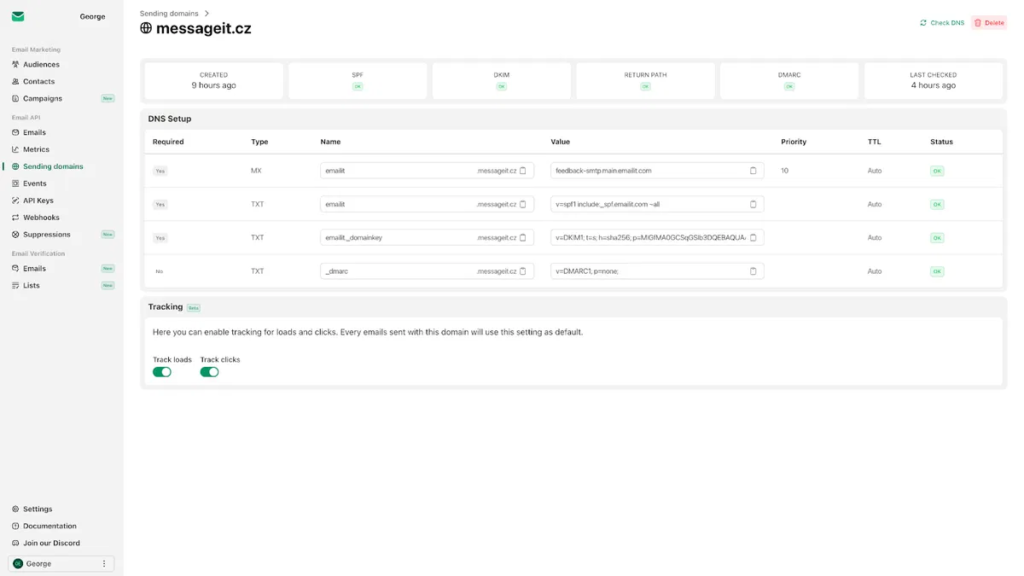
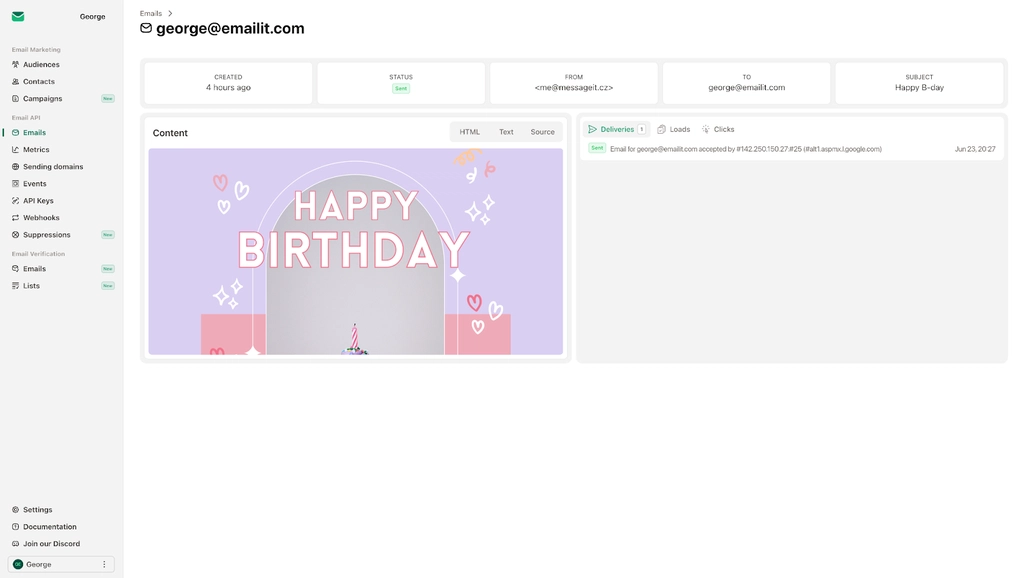
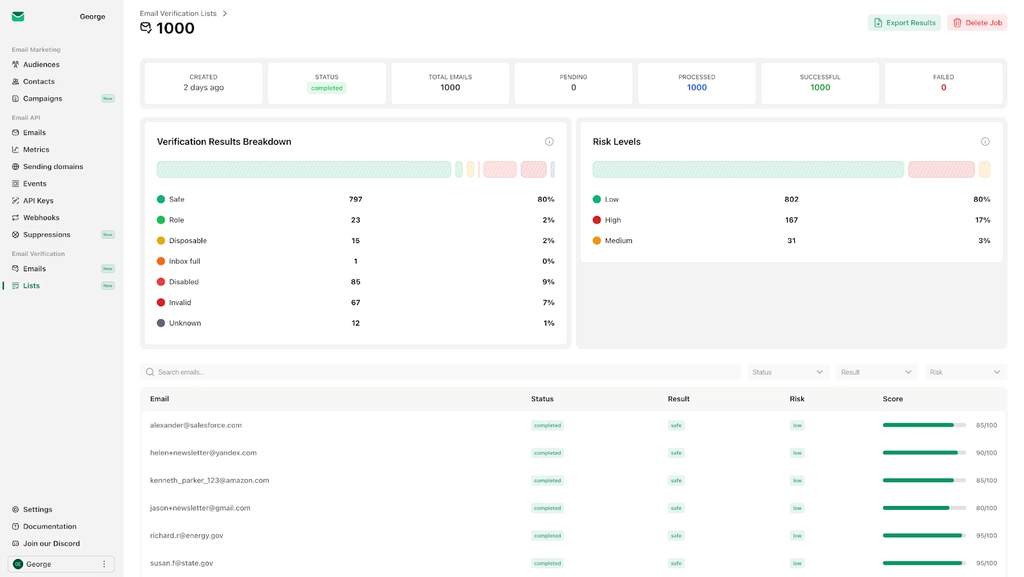
What makes for a smooth start when diving into a new email platform? For me, it’s how Emailit handles onboarding. I was assigned to a starter IP pool, which needs manual verification—annoying, sure, but it stops spammers. I hit a few snags with SPF/DKIM setup, but support on Discord helped within minutes. During random testing, I triggered an edge case with API keys, but George fixed it fast. The dashboard’s clean and keeps everything—analytics, domains, webhooks—in one place. I love that I can track opens, clicks, and bounces without switching screens. Setup for WordPress was a breeze. It just works.
Get 30% off Now
How do you actually snag that 30% off deal for Emailit without wasting time on expired codes or fine print traps? I check AppSumo first—bundles there often beat standard pricing strategies by 30% or more. You’ll want to verify discount eligibility: some deals only work for new users or specific plans. Don’t overlook Emailit’s official site—holiday sales like Black Friday usually drop 30% codes. I always subscribe to their newsletter; I’ve scored early-access discounts that way. Paste the code at checkout and confirm the savings appear before paying. Avoid third-party sites without verified reviews—some codes are outdated. Simple rule: if it looks too good to be true, it probably is. Stick with trusted sources and you’ll save stress, too.
Alternatives
I’ve tested a few Emailit alternatives, and Neo stands out as the best overall pick—users love how reliable and simple it is.
If you’re watching your budget, MailerSend offers a generous free plan with no daily caps and a slick interface that makes sending fast.
For developers or teams needing power under the hood, Mailgun brings strong tools and solid delivery, though it’s pricier than Emailit.
Alternative #1
So, you’re ready to move on from Emailit and want a solid backup plan? I’ve tested several, and Neo stands out as the best overall alternative. It’s reliable, simple, and beats tools like BlueMail. If alternative pricing matters, Brevo starts at $8.08/month with a free tier (300 emails/day).
For email deliverability, Amazon SES offers flexible IP options, while Mailgun includes testing tools—great for devs. MailerSend gives a free 3,000-email plan and no daily cap. All support transactional emails. I’d pick Neo for ease, but check Mailgun or Amazon SES if you want control. Try a few—you’ll find one that fits.
Alternative #2
Looking for another solid Emailit alternative that won’t leave you scrambling for features or fair pricing? I’ve got you. Mailgun stands out if you’re into tech or run a growing business. It’s developer-friendly, with powerful tools to send transactional emails reliably. You get 5,000 free emails in the first month—perfect for testing. Plans start at $35 for 50k emails, which is fair for what you get. It includes deliverability testing, so your messages avoid spam folders. Just don’t dive in to unrelated topic tweaks or go off topic ideas with design—it’s built for function, not flair. Reliable, scalable, and smart for coders. Try it if clean APIs beat flashy buttons for you.
Alternative #3
| Tool | Free Tier | Best For |
|---|---|---|
| Brevo | 300 emails/day | SMBs, SMS campaigns |
| MailerLite | 1,000 subs | Freelancers |
| Neo | User reviews | Reliable delivery |
Conclusion
Why do so many users keep coming back to Emailit despite a few quirks? Because it nails delivery optimization and keeps emails in your inbox, not spam. I’ve tested it, and the high-reputation IPs and built-in email verification really boost inbox placement. Even with minor hiccups in onboarding or the marketing module, it’s reliable. The founder’s hands-on support on Discord? Fast and helpful. If you need solid delivery, great API tools, and low costs, I say go for it. Just verify your list early and use those 300+ templates. It’s not perfect, but for transactional or small-scale marketing emails, Emailit gets the job done—quietly, consistently, and without drama.
Frequently Asked Questions
How Secure Is Emailit for Sensitive Data?
I wouldn’t trust Emailit with sensitive data—privacy concerns arise from no end-to-end encryption, unclear data residency, and minimal authentication. They lack zero-access encryption and audits, so I avoid storing or sending confidential info through their system.
Can I Integrate Emailit With CRM Tools?
Yes, I can integrate EmailIt with CRM tools using a seamless integration workflow. I set up data mapping to sync leads and trigger emails instantly, ensuring my CRM stays in lockstep with customized, automated outreach—all through simple, secure connections.
Is There a Free Trial Available?
I checked—there’s no free trial, but I can test Emailit risk-free with their 30-day money-back guarantee. I’ll get peace of mind knowing my data security is protected while I try it out.
Does Emailit Support Multiple Languages?
Yes, I can create emails in multiple languages with Emailit, though the interface stays in English. I handle multilingual automation by manually adding translated content, since automatic language routing or UI translation isn’t supported right now.
What Happens if the AI Makes an Error?
What happens if the AI makes an error? I catch it before sending by default—drafts stay editable so I can review, correct, and approve. My error handling uses checks, human-in-the-loop review, and unsend options to fix mistakes fast.
