

I’ve tested Neuronwriter, and it’s the only tool that blends real-time SEO scoring, AI drafting, and competitor analysis in one place. As I write, it gives color-coded feedback, suggests keywords, and flags missing subheadings. The Chrome extension keeps my SEO insights visible, and real-time NLP tips sharpen my tone. It’s powerful for long-form, SEO-driven content, though the dashboard takes time to master—stick with it, and you’ll see exactly where your content stands and how to beat the competition.

Introduction
Let’s cut through the noise—NeuronWriter isn’t just another AI writing tool. I’ve used plenty, but this one actually gets what I need: smarter SEO without guessing. It checks top-ranking pages and suggests key terms so I never drift into an unrelated topic or go off topic. The real-time score shows if my content’s on track—green for good, yellow if I’m missing something. I write faster, stay focused, and skip the backtracking. No fluff, no confusion. If you’ve ever wasted time rewriting? This fixes that. Straightforward, helpful, and built for real writers. Try it. You’ll see the difference by paragraph two. It even includes an AI text humanizer to make generated content sound natural and engaging. This tool delivers real-time content generation directly in the editor, so you never lose momentum.
Ai-Powered Content Editor
I’ve already seen how NeuronWriter keeps me on track with its smart SEO feedback, but the real power kicks in the moment I start writing—because this isn’t just a blank page with some suggestions. It’s an AI-powered workspace that helps me build content fast and optimize it as I go. The tool analyzes top-ranking pages using semantic SEO to deliver data-backed recommendations and relevant keyword placements. With just a short text description, NEURONwriter can generate unique visuals on demand, ensuring each piece is enriched with AI-generated graphics.
| Feature | Benefit |
|---|---|
| Start Paragraph, Rephrase, Expand | Instant drafts & refinements |
| Creativity Sliders & Language Control | Perfect tone and localization |
| Custom Templates & Fact Extraction | Faster, accurate content optimization |
I tweak drafts right in the editor, using real-time cues to improve clarity and coverage—no guesswork, just progress.
Real-Time SEO Analysis
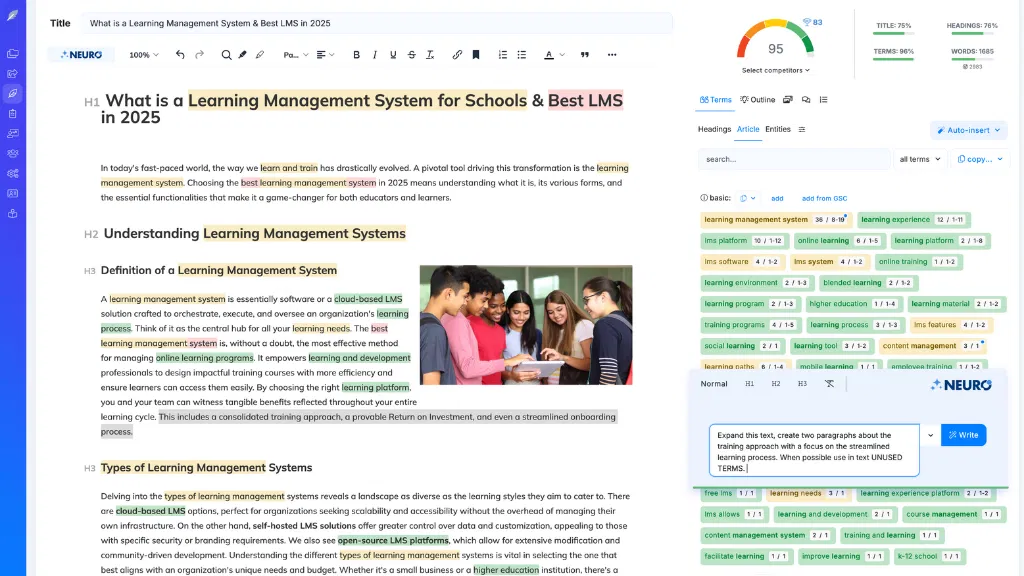
I love how Neuronwriter gives me live SEO updates while I write, so I always know if my content is on track. The on-screen tips show exactly where to add terms, tweak headings, or enhance coverage, and I can see my content score jump in real time. With instant keyword tracking and dynamic scoring, I’m not guessing—I’m building smarter pages from the start. It uses SERP analysis to deliver those actionable insights as you write. This works because the tool performs semantic concept identification to understand user intent beyond just keywords.
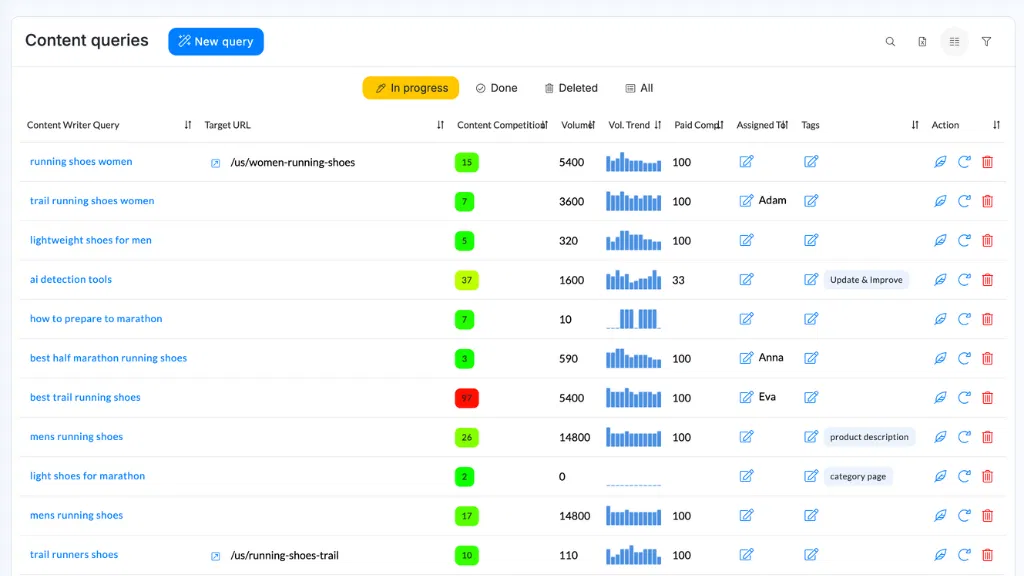
Live SEO Updates
How do you know if your content stands a chance before it even hits publish? With Neuronwriter’s live updates, you don’t guess—you see real time insights as you write. The sidebar shows your content score instantly, tracking SEO strength while you work. It checks NLP term coverage, compares your draft to top-ranking pages, and flags gaps fast. I love getting live feedback—like knowing I’m missing key phrases competitors use. The Chrome extension keeps everything in view, so improving SEO feels natural, not stressful. You’re not left wondering; you’re guided, step by step, with clear, actionable tips. This real-time guidance is powered by semantic SEO, helping you align with user intent and related concepts for stronger search performance. Content Score evaluates your SEO optimization in real time, ensuring your post is fully optimized before publishing.
On-Screen Optimization Tips
Let’s talk about your on-screen helper—Neuronwriter’s real-time SEO analysis—that works like a savvy editor looking over your shoulder, not to judge, but to guide.
You get instant, color-coded feedback as you write, making on screen optimization simple and effective. Real time previews show how your content scores against top competitors, so you know exactly where to tweak headings or add keywords.
I love how it flags weak subheadings or missing H2s and suggests fixes before you publish. It’s like training wheels for SEO—helpful, not pushy.
You stay focused, make smarter edits, and build better-structured content without guesswork. AI-driven suggestions from SERP analysis help refine your content while you write. This feature leverages competitor SERP analysis to identify top-performing content patterns and guide your optimization strategy.
Instant Keyword Tracking
Think of Instant Keyword Tracking as your content’s GPS for SEO—it doesn’t just show where you are, it tells you exactly where to go. With real-time feedback, I can instantly see which semantically relevant terms I’m missing. Neuronwriter’s instant keyword tracking analyzes top-ranking pages and suggests phrases tied to search intent, not just keywords. It uses NLP to uncover hidden gaps, like related concepts or synonyms I wouldn’t think of. I get scored live as I write, so I know when my content hits the sweet spot. Plus, it shows exactly where to add terms for better semantic relevance—no guesswork. It’s smart, fast, and keeps my content focused. I don’t just rank—I understand why.
Real-Time Rank Monitoring
What if you could watch your content climb the rankings the moment it goes live? With NeuronWriter, I do—it’s like live TV for SEO. The real time monitoring shows clicks, impressions, and ranking shifts straight from Google Search Console. I spot which pages fight each other for the same keyword tracking data and fix cannibalization fast. It tracks my keyword rankings, CTR, and traffic the second they change. I adjust posts on the fly, guided by live feedback. No waiting weeks to see progress. If a page dips, I tweak it immediately. Real time monitoring turns guesswork into action—and keeps me one step ahead without stress.
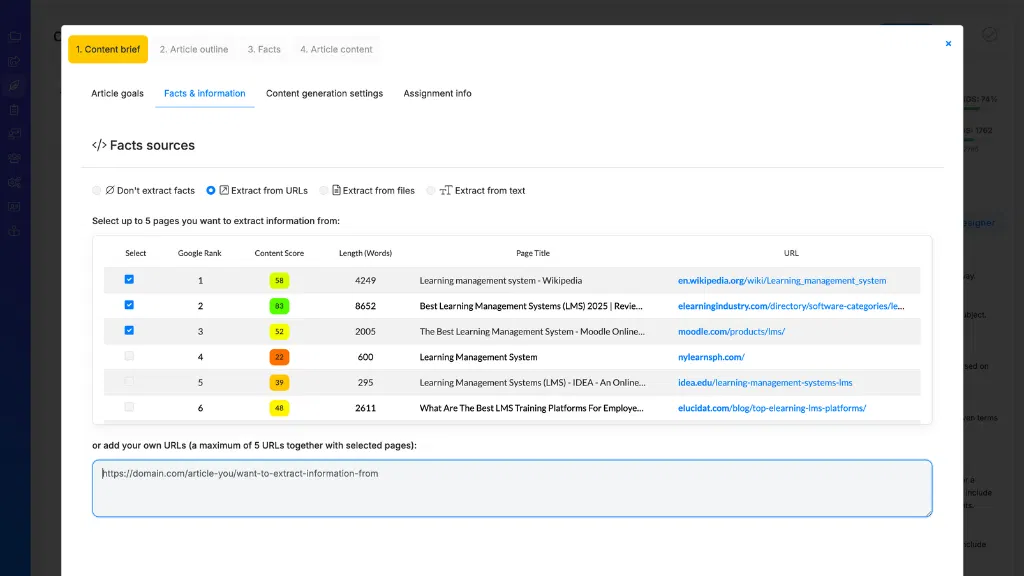
Dynamic Content Scoring
While most SEO tools grade your content once and call it a day, NeuronWriter’s Dynamic Content Scoring keeps giving live feedback—like a personal coach for your blog post. As I write, the dynamic scoring updates in real time, showing me exactly where my content shines or sags. It analyzes readability, keyword use, and structure while suggesting smart personalization strategies—like tweaking language for intent or adding dynamic elements based on user behavior. I can adjust on the fly, knowing I’m not just guessing. With this kind of live insight, I build stronger, more engaging content that ranks faster and converts better—all without overthinking it.
Pricing
NeuronWriter’s pricing is built around five clear plans—Bronze, Silver, Gold, Platinum, and Diamond—giving you room to scale based on your content needs. I find the pricing plans straightforward, starting at $23/month (Bronze) and going up to $117 (Diamond), with annual discounts saving you about 17%.
Need more flexibility? Check out AppSumo deals—they offer lifetime access now and then, which can save you big long-term.
Bronze gives you 25 analyses and 15k AI credits; Diamond offers 150 analyses and 75k credits. For teams, higher tiers unlock better support and limits. If you’re scaling content, I’d suggest Gold or above.
Pros and Cons
I’ll be honest — Neuronwriter has some real strengths, especially if you want data-driven SEO guidance while you write. Its real-time SEO score, SERP analysis, and AI-powered content suggestions help me shape articles that rank, and the internal link finder is a small feature I actually use daily. But it’s not perfect — the AI can slip up or sound robotic, and if you’re on a tight budget or need tons of templates, you might hit limits fast.
Pros
Speed is the name of the game, and NeuronWriter delivers it right out the gate. I save minutes every time I start a new article, thanks to AI templates and instant outlines. The content scoring system keeps me on track with SEO, showing exactly where to add keywords or adjust headings. No more guessing—just clear, real-time feedback.
- AI templates speed up blog posts, meta descriptions, and more
- Content scoring grades your article against top-ranking pages
- Auto-insert terms fill topic gaps without extra research
- Real-time NLP suggestions boost relevance and readability
It’s like having an SEO editor watching your back as you write.
Cons
Now that we’ve covered the strong points—fast outlines, smart SEO scoring, and helpful real-time tips—it’s time to talk about where NeuronWriter falls short.
- Steep learning curve: The cluttered dashboard slows beginners.
- Limited language support: Non-English content lacks depth and accuracy.
- High subscription cost: Budgets can’t always justify pricing, especially with weak productivity metrics.
- Performance issues: Slow load times and AI delays hurt workflow—plus, security concerns pop up with data handling.
It’s not all bad, but if you need quick multilingual output or tight budgets, look closely. I’d test first—especially if real-time work matters.
User Experience
Let’s talk about what it’s actually like to use Neuronwriter every day—how it feels, how fast you can get things done, and whether it gets in your way or helps you move forward.
The interface clarity makes work smooth: clean panels, color-coded term heatmaps, and smart tooltips keep things intuitive.
Onboarding usefulness stands out—tutorials, AI templates, and video guides get me up to speed fast.
I create drafts quickly with the Content Designer, tweak tone with creativity sliders, and use real-time SEO tips without switching tabs.
The Chrome extension even helps outside the app.
It’s not perfect, but it’s reliable, learnable, and built for steady progress, not flash.
0% off First Month
What if your first month on Neuronwriter felt like a test drive with full power, not a trial with training wheels? With full first month access, I got all 15,000 AI credits on Bronze right away—no limits. That’s enough for about 15 blog posts. Projects and analyses unlocked immediately too: 2 projects, 25 content checks. No hidden caps. Pricing clarity helped me pick Bronze at $23 without guessing. No discount, but no surprises either. Each plan gives full credits upfront, so you really test the tool. Try it knowing exactly what you’re getting—no gimmicks.
Alternatives
If Neuronwriter isn’t quite the fit, I’ve got three solid alternatives you should know about.
Surfer SEO nails content planning with real-time tips based on top-ranking pages, making it great if you want structure and teamwork.
Frase speeds up research and drafting, while Jasper leans into high-volume, creative content—so your choice depends on whether you value depth, speed, or output.
Alternative #1 Writesonic
When it comes to AI writing tools that can step in for NeuronWriter, WriteSonic is one of the first names that comes up—and for good reason. I’ve used it for blogs, ads, and product pages, and its templates save me serious time. It nails tone controls and rewriting, which helps me stay on topic—and avoid sounding like I’m rambling about an irrelevant topic. Sure, it won’t auto-optimize for SEO like some tools, but if you’re just trying to write clearly and keep your message focused, it’s a solid pick. Just don’t expect it to catch every off topic sentence without some manual editing. For quick, clean drafts that sound like you, WriteSonic delivers.
Alternative #2 SurferSEO
| Feature | Surfer SEO | What It Means |
|---|---|---|
| Content Editor | Real-time score | Fix issues as you write |
| Keyword Research | Topical modeling | Cover what ranks |
| Pricing | Mid-$ to high | Better for teams |
| Strengths | NLP guidance | Fewer tools needed |
| Limitations | Steep start | Needs practice |
Alternative #3 Scalenut
Now let’s look at a few more solid NeuronWriter alternatives that stand out for different reasons—especially if you want speed, simplicity, or a broader content toolkit. Scalenut impresses with strong UI customization, letting you tweak dashboards to fit your workflow. Its onboarding efficiency means you’re creating SEO-optimized content fast—no steep learning curve. It bundles keyword research, content briefs, and backlink tools in one place. I like how it plans, writes, and amplifies content at scale. At $49/month, it’s pricier, but if you want an all-in-one SEO content hub, this is a smart, steady pick—no fluff, just fuel.
Conclusion
So, is Neuronwriter worth your time in 2025?
Absolutely, if you’re building an AI strategy for SEO-driven content. It nails content governance with clear NLP checks, SERP analysis, and one-click publishing. I use the outline builder and autoinsert keywords daily—they save hours. The color-coded editor shows keyword density at a glance, making optimization intuitive. Yes, the AI sometimes spits out messy paragraphs, but a quick edit fixes it. For long-form blog posts or landing pages, it’s a powerhouse. I’d skip the lowest plan—upgrade to mid-tier for plagiarism checks and GSC integration. If you want smarter, better-optimized content without juggling five tools, Neuronwriter’s my pick.
Frequently Asked Questions
Can Neuronwriter Generate Content in Multiple Languages?
Yes, I generate content in multiple languages using AI. I support language translation and multilingual SEO, optimizing for 170+ languages, so you can target global audiences effectively with region-specific, high-quality, NLP-driven content.
Does Neuronwriter Offer a Mobile App for Writing on the Go?
No, I don’t have a mobile app, so writing on the go isn’t possible through a dedicated app. I rely on browser access, which lets me work from any device, but the experience is best on desktop for full feature use.
Is There a Limit to the Number of Documents I Can Create?
I can’t create unlimited documents—you’re right to ask. The limit of documents ties to your monthly content-analysis quota, not multi language support, and resets each month. I plan my work around that.
How Does Neuronwriter Handle Content Plagiarism Checks?
I run plagiarism checks right in the editor using PlagiaShield, which scans your text against online sources. I’ll show you matched sentences, sources, and a uniqueness percentage—how plagiarism detection works—while highlighting that accuracy is measured by comparison depth, though no tool catches everything perfectly.
Can I Integrate Neuronwriter With My Content Management System?
Yes, I integrate Neuronwriter with my CMS using its WordPress plugin for seamless integration compatibility. I rely on multi-platform syncing to keep content aligned across systems, saving time and preserving formatting every step of the way.
